Best Stud Finders 2026: Magnetic, Electronic & Multi-Mode Picks
The most expensive mistake you can make with a stud finder is buying a cheap one and trusting it. The second most expensive mistake is buying a good one and using it wrong. The most common failure mode: calibrating the finder on a wall where a stud is already directly underneath the sensor, getting a false clear reading, then drilling into nothing or through a wire. This guide explains how stud finders actually work, what separates the types, and then picks the eight best options for every buyer from the homeowner hanging one TV to the contractor framing interiors every week.
All eight picks below are verified for the US Amazon marketplace as of July 2026. Every named model uses a confirmed Amazon product page link -- no guessed ASINs.
At a Glance
 Franklin Sensors ProSensor 710+ Stud Finder with...
 CH Hanson 03040 Magnetic Stud Finder
 DEWALT Stud Finder, 3/4”, Locate Framing Studs...
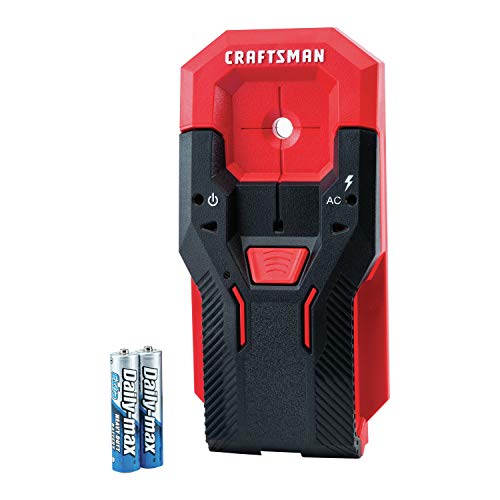 CRAFTSMAN Stud Finder, 3/4-Inch Depth, AC Detection...
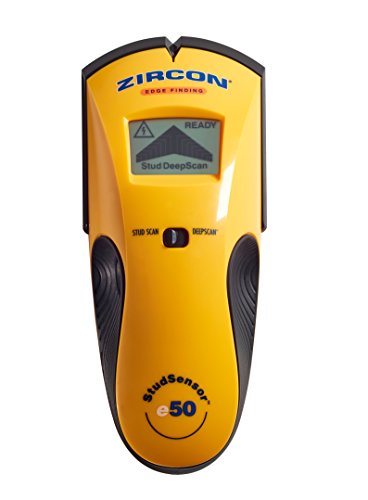 Zircon StudSensor e50 Electronic Wall Scanner / Edge...
 Ryobi Whole Stud Detector with LED Indicator ESF5001
Product images and titles from Amazon. As an Amazon Associate we earn from qualifying purchases.
Quick Picks by Buyer Type
| Buyer type | Best pick | Type | Scan depth |
|---|---|---|---|
| Best overall (most accurate) | Franklin Sensors ProSensor 710+ | Multi-sensor electronic | 1.6 in |
| Best budget (no batteries) | CH Hanson 03040 Magnetic | Magnetic | N/A |
| Best for beginners (center-finding) | DEWALT DW0100 | Electronic / center-finding | 3/4 in |
| Best value electronic with AC detection | CRAFTSMAN CMHT77620 (I own this one; it has earned its spot.) | Electronic / center-finding | 3/4 in |
| Best for AC wire safety | Zircon StudSensor e50 | Electronic / edge + deep scan | 1.5 in |
| Best whole-stud display | Ryobi ESF5001 | Electronic / whole-stud LED | Auto-depth |
| Best all-in-one scanner (4 modes) | Zircon MultiScanner A250 | Multi-mode scanner | 1.5 in (wood/metal) |
| Best professional / deep metal scan | Bosch GMS120 | Multi-mode digital scanner | 4.7 in (metal) |
How Stud Finders Work: Types Explained
| Type | How it detects studs | Best for | Limitation |
|---|---|---|---|
| Magnetic | Rare-earth magnet grabs the metal screws/nails fastening drywall to the stud | Quick checks, no-battery reliability, any wall | Slower -- requires sliding and feeling for pull; no AC detection; won't find adhesive-only studs (rare) |
| Electronic (edge-finding) | Capacitance sensor detects density change at stud edge; beeps and lights at each edge | Basic hanging, most residential drywall | Requires calibration on empty wall; most common source of user error |
| Electronic (center-finding) | Finds both edges then calculates center; marks center directly | Beginners; TV mounting where center mark matters | Same calibration requirement as edge-finding; 3/4 in depth limits use on thick walls |
| Multi-sensor (simultaneous) | Array of 13+ sensors detects full stud width in one pass -- no edge-finding, no calibration step | Highest accuracy; fast; no calibration errors possible | Higher cost; does not include AC detection on the 710+ |
| Whole-stud LED | LED bank illuminates across the entire stud width so you can see it rather than beep for edges | Visual learners; anyone who has missed a stud mid-hole | Requires correct depth calibration; LEDs can be hard to read in bright light |
| Multi-mode scanner | Separate modes for wood, metal, copper/aluminum, and AC live wire; handles concrete, tile, and plaster in some models | Contractors; multi-material walls; professional installs | Largest and most expensive; overkill for basic residential use |
Key Specs: What Actually Matters
| Spec | What it means | Why it matters |
|---|---|---|
| Scan depth | How deep into the wall the sensor reads | Standard drywall is 1/2 in -- 3/4 in depth covers it with margin; 1.5 in handles double-layer drywall; plaster walls need 1.5 in minimum or a dedicated plaster mode |
| Calibration method | How the finder establishes its baseline before scanning | Edge-finders and center-finders calibrate by pressing against open wall (no stud underneath) -- calibrating on a stud gives a false baseline; multi-sensor designs like the Franklin 710+ auto-calibrate and cannot be miscalibrated |
| AC wire detection | Alerts when live unshielded electrical wiring is detected behind the wall | Useful safety layer near outlet boxes, switches, and kitchens; not a substitute for turning off the circuit -- always de-energize before drilling |
| Wood vs metal stud mode | Whether the finder detects metal framing studs (not just metal pipes) | New construction condos and apartments are often metal-framed; a finder that only detects wood via density change may misread metal studs or produce erratic results |
| SpotLite Pointer | Zircon's built-in LED that shines a light dot on the wall at the detection point | Lets you mark the stud without lifting and repositioning the finder; useful on dark walls |
| Display type | LED arrows, LCD display, or full LED array | LED arrows (DEWALT, CRAFTSMAN) are visible in most light; LCD displays (Zircon A250, Bosch GMS120) give depth readouts and mode information; full LED arrays (Ryobi ESF5001) show stud width at a glance |
| Battery type | AA, AAA, or 9V | Stud finders used occasionally can sit discharged for months; AA and AAA are easier to source than 9V in an emergency; magnetic finders require no battery at all |
The 8 Best Stud Finders of 2026
Franklin Sensors ProSensor 710+ Professional Stud Finder
The Franklin ProSensor 710+ is the stud finder most professionals and serious homeowners should buy and keep permanently. It uses 13 sensors spanning the full 3.5-inch width of a standard stud, detecting all of them simultaneously in a single pass. When you slide the 710+ across a wall, every LED in the array that sits over a stud lights up at once -- you see the full stud width in real time, left edge to right edge, as you move. There is no calibration step, no baseline press on open wall, no single-point beep to interpret. You cannot miscalibrate it because there is no calibration. The most common cause of stud-finder frustration -- pressing the button on top of a stud and getting a wrong reading -- is architecturally impossible with the 710+. The auto-depth selection handles changes in drywall thickness or composition without any input from you. It finds wood studs and metal studs and switches modes automatically. Built-in bubble level lets you confirm a horizontal mark without a separate tool. Made in the USA. The 710+ is the right answer for anyone who has ever drilled a hole and hit nothing because a cheaper finder lied to them.
Pros
- 13-sensor array: no calibration errors possible -- the most reliable design available
- Shows full stud width in real time: left edge, center, and right edge simultaneously
- Auto-depth selection handles varying drywall thickness
- Detects wood and metal studs; auto-selects mode
- Built-in bubble level; no separate tool needed for level marks
- Made in the USA
Cons
- No AC live wire detection -- add a separate voltage tester if working near outlets
- Higher price than single-sensor electronic finders
- Wider body than compact finders -- harder to use in tight spaces near corners
CH Hanson 03040 Magnetic Stud Finder
The CH Hanson 03040 is the correct stud finder for the homeowner who hangs things a few times a year and wants a tool that is always ready when they need it. There are no batteries to go dead, no calibration to botch, and no display to read. The 03040 uses a powerful rare-earth magnet to detect the screws or nails that hold drywall to the stud behind it. When the magnet locks onto a fastener, you feel a pull and see the tool tilt or hold. Mark the spot: the stud is directly behind it. Slide six to eight inches horizontally and find the next fastener -- now you know both edges and the center. The tool is small enough to live in a junk drawer or toolbox indefinitely. The built-in rotating level adds a second function without additional tools. At under $15 for a single unit, this is also the correct answer for apartment dwellers who hang things occasionally: buy it once and it outlasts every electronic stud finder in the house. The limitation is patience -- magnetic detection requires slow, deliberate sliding and attention to subtle tactile feedback. On old plaster-over-lath construction where there are no metal fasteners near the stud face, a magnetic finder will not perform consistently.
Pros
- No batteries: always ready; stores indefinitely without discharge concern
- No calibration: zero user error possible
- Under $15: lowest cost stud finder that actually works
- Built-in rotating level
- Detects screws and nails through any drywall thickness
Cons
- Requires slow, deliberate sliding -- faster than about 1 in/sec and you miss pulls
- No AC wire detection
- Will not find studs on adhesive-only panels or behind heavy tile without metal fasteners
- Old lath-and-plaster walls with sparse nails are inconsistent
DEWALT DW0100 3/4-Inch Center-Finding Stud Finder
The DEWALT DW0100 is the right first electronic stud finder for someone who has never used one before. The center-finding design skips the edge interpretation step that trips up most beginners: instead of beeping at each edge and requiring you to measure between two marks, the DW0100 locates both edges internally and then tells you directly where the center is with LED directional arrows. Left arrow means the stud center is to your left; right arrow means right; both arrows lit means you are centered. An audible alert confirms the center position. AC live wire detection activates automatically in both scan modes, alerting you if live unshielded wiring is present behind the scan area. Constant auto-calibration adjusts for minor wall variations without requiring a manual baseline press. The slim profile fits in a toolbox without taking up significant space. 3/4-inch scan depth covers standard 1/2-inch drywall with margin. AAA batteries are included. For mounting a TV bracket, installing floating shelves, or hanging a heavy mirror -- tasks where hitting the center of the stud is the entire goal -- the DW0100 is purpose-built and easy to use correctly on the first attempt.
Pros
- Center-finding: tells you where to drill directly, no edge math required
- Directional LED arrows: left/right/centered indication is immediately clear
- AC live wire detection active in both scan modes
- Constant auto-calibration reduces setup error for beginners
- AAA batteries included; slim, easy to store
Cons
- 3/4 in scan depth: will not penetrate double drywall or plaster reliably
- Single-sensor design: miscalibration on a stud still possible
- Does not show stud width -- only center position
CRAFTSMAN CMHT77620 3/4-Inch Center-Finding Stud Finder with AC Detection
The CRAFTSMAN CMHT77620 occupies the same budget-friendly center-finding category as the DEWALT DW0100 at a consistently lower price point, making it the value pick for anyone who wants electronic center-finding and AC detection without paying a brand premium. The CMHT77620 locates stud edges and centers through standard 1/2-inch drywall to a depth of 3/4 inch, with LED indicators showing edge detection, center location, and AC live wire warning on the same display. The center-finding function marks the stud center directly -- the same beginner-friendly feature as the DEWALT. AC detection alerts activate when live unshielded wiring is present, adding the same safety layer as mid-range Zircon and DEWALT models at a lower cost. CRAFTSMAN's center-marking channel cut into the top of the tool lets you draw a mark without repositioning or removing your hand from the finder. For a homeowner who wants a reliable electronic finder with AC detection and is not ready to spend on the Franklin ProSensor, the CMHT77620 delivers the core functionality at the lowest price in this guide that still includes AC detection.
Pros
- Center-finding with LED display: clear indication for beginners
- AC live wire detection included at a lower price than comparable models
- Center-marking channel cut into the tool body: no lifting to make your mark
- Lowest price in this guide that includes both center-finding and AC detection
Cons
- 3/4 in scan depth: not suitable for thick drywall, double-layer walls, or plaster
- Single-sensor design: calibration error risk if pressed against a stud initially
- Display is smaller than premium models; harder to read at a glance
Zircon StudSensor e50 Electronic Stud Finder with WireWarning Detection
The Zircon StudSensor e50 is the best choice for anyone whose priority is avoiding hidden wiring during a project. The e50 combines two scan modes (StudScan at 3/4 inch depth and DeepScan at 1.5 inches) with Zircon's WireWarning Detection, which alerts you when live unshielded electrical wires are detected up to 2 inches deep -- active in both scan modes simultaneously. Unlike single-mode finders where you switch manually between stud detection and wire detection, the e50 monitors for AC wiring automatically while you are looking for studs. DeepScan mode doubles the penetration depth to 1.5 inches, making the e50 usable on walls with extra layers of drywall, insulated panels, or moderately thick plaster where 3/4-inch finders fail. The LCD display shows a stud-approach indicator with progressively more bars as the sensor nears a stud edge, plus a separate AC warning indicator. SpotLite Pointer illuminates a red dot directly on the wall surface at the detection point so you can mark without repositioning. The e50 is the right choice for kitchens, bathrooms, and older homes where wire runs are unpredictable -- any situation where you genuinely want to know about wiring before you drill.
Pros
- WireWarning Detection active in both stud scan modes -- no mode-switching required
- DeepScan mode: 1.5 in penetration for thick or double-layer drywall
- SpotLite Pointer marks the wall surface at detection point
- LCD approach indicator shows how close you are to a stud edge -- not just an abrupt beep
- Detects wood and metal studs in both modes
Cons
- Edge-finding only -- no center calculation; you identify center by finding both edges
- Manual calibration required on open wall before each new scan area
- AC detection indicates probability, not certainty -- always de-energize the circuit before drilling
Ryobi ESF5001 Whole Stud Detector with LED Indicator
The Ryobi ESF5001 solves the most frustrating problem with edge-finding stud finders: the beep tells you where the edge is, but you can still drill between two marks and miss the stud. The ESF5001's LED array illuminates across the full width of the detected stud -- you can see the stud's entire footprint on the wall face before you drill, not just two edge marks. Move the finder left and right and watch the LED field shift with the stud position in real time. Auto Deep Scan technology automatically determines drywall thickness and adjusts detection depth so you do not have to choose between shallow and deep scan modes manually. One-handed operation: the detection trigger is on the front face of the finder, not the top, so you can hold it flat against the wall and operate it with one hand while the other holds a pencil. A single LED at the top of the tool confirms detection independent of the stud-width array for quick checks. The ESF5001 is the right choice for visual learners, for anyone who has misread edge marks before, and for anyone mounting heavy items where knowing the full stud width before drilling matters for anchor placement.
Pros
- LED array shows full stud width -- not just edge marks; see the whole stud before drilling
- Auto Deep Scan: no manual depth mode selection
- One-handed operation: front-face trigger keeps the other hand free
- Real-time stud position: shift the finder and the LED field follows the stud
Cons
- LED array can be hard to read in direct sunlight or bright work lighting
- No AC wire detection on the ESF5001 -- check for a Ryobi model with AC mode if safety detection matters
- Requires calibration on open wall like standard edge-finders
Zircon MultiScanner A250 All-In-One Stud Finder with 4 Scan Modes
The Zircon MultiScanner A250 is the right choice for homeowners who want a single tool that handles wood studs, metal pipes and conduit, copper and aluminum wiring, and AC live wire detection without switching devices. Four distinct scan modes -- StudScan (3/4 in depth), DeepScan (1.5 in), Metal Scan (detects metal pipes, conduit, rebar, and metal studs), and AC Scan (live wire detection) -- give you complete situational awareness of what is behind the wall before drilling. An LCD display shows depth indication, mode selection, and an approach indicator that scales from zero to full bar as you close on the target. SpotLite Pointer marks the detection point directly on the wall surface. Zircon's ACT (Auto Correcting Technology) adjusts the baseline calibration dynamically to compensate for minor wall variations and surface inconsistencies during the scan. Center-finding mode calculates stud center from both detected edges and marks it on the display. The A250 is the right upgrade from a basic edge-finder for anyone who has run into surprises -- a metal pipe where a stud should be, a wire run in an unexpected path -- and wants comprehensive detection in one unit before any future project.
Pros
- 4 scan modes: wood stud, deep scan, metal/pipe detection, AC wire -- one tool for all scenarios
- LCD display with approach indicator and depth readout
- Center-finding mode calculates and displays stud center
- ACT calibration compensates for wall inconsistencies automatically
- SpotLite Pointer marks wall surface at detection point without lifting the tool
Cons
- More expensive than basic edge-finders -- overkill if you only need to find wood studs in standard drywall
- 9V battery (less common than AA/AAA) -- buy a spare before a long project
- Four modes mean more reading time before you get comfortable -- not the fastest tool for a quick check
Bosch GMS120 Digital Multi-Scanner with Wood, Metal, and Live Wire Modes
The Bosch GMS120 is a professional-grade wall scanner that goes well beyond what a standard stud finder handles. Its three scan modes cover the full range of what contractors encounter behind walls: a Wood mode that detects wood studs and joists to 1.5 inches deep, a Metal mode that detects ferrous metal (steel studs, pipes, rebar, conduit) up to 4.7 inches deep and non-ferrous metal (copper pipes, aluminum conduit) up to 3 inches deep, and a Live Wire mode that detects AC-energized conductors up to 2 inches deep. The 4.7-inch metal detection depth is the standout spec: it finds rebar in concrete slabs, large steel I-beams, and deeply buried conduit that no standard stud finder reaches. The GMS120's LED ring indicator surrounds the scan point -- when the full ring lights, you are over the center of the detected object. A dedicated mode LED tells you which scan type is active so there is no confusion mid-scan. The ergonomic body sits flat against the wall with a centered grip rather than the pencil grip of most stud finders, which improves stability during slow professional scans. The GMS120 is the correct tool for contractors running new wiring, plumbers tracing pipes, and anyone hanging very heavy loads in concrete-adjacent construction where rebar location matters.
Pros
- 4.7 in metal detection depth: finds rebar, large pipes, and conduit well past standard stud finder range
- Detects ferrous vs non-ferrous metal: differentiates steel from copper/aluminum
- LED ring indicator centers on detected object precisely
- Three modes cover wood, metal, and live AC wire in one tool
- Professional build quality for jobsite use and repeated scanning sessions
Cons
- Premium price -- significantly more than any other finder in this guide
- More capability than most homeowner projects need
- Requires a 9V battery not included in some listings
Stud Finder Decision Guide
| Your situation | Best choice | Why |
|---|---|---|
| Standard drywall, hanging a TV or heavy shelves, want to be right every time | Franklin ProSensor 710+ | 13-sensor array cannot be miscalibrated; shows full stud width; the only stud finder that eliminates user error by design |
| Light occasional hanging, want no batteries or calibration | CH Hanson 03040 Magnetic | Under $15, no batteries, zero calibration -- grab it, find the screw, drill; works on any age of residential drywall |
| First stud finder, mounting a TV bracket, want the simplest correct answer | DEWALT DW0100 | Center-finding gives you the drill spot directly; AC detection adds safety; auto-calibration reduces setup errors for first-time users |
| Want center-finding and AC detection at the lowest price | CRAFTSMAN CMHT77620 | Same core features as DEWALT at a lower price; center-marking channel built into the body |
| Working near outlet boxes, kitchen, bathroom, or older wiring | Zircon StudSensor e50 | WireWarning Detection active in both scan modes simultaneously; DeepScan handles thicker walls common in older homes |
| Visual learner; have missed studs before with edge-only finders | Ryobi ESF5001 | LED array shows full stud width in real time -- you see the stud, not just two edge beeps |
| Want one tool for wood, metal pipe, and AC wire detection | Zircon MultiScanner A250 | Four scan modes cover all residential wall materials; center-finding and ACT calibration in one unit |
| Contractor, plumber, electrician, or concrete-adjacent work needing deep metal detection | Bosch GMS120 | 4.7 in metal depth for rebar and large conduit; ferrous vs non-ferrous differentiation; professional build for repeated jobsite use |
How to Use a Stud Finder Without Missing the Stud
The calibration mistake: Electronic stud finders calibrate to the baseline density of the wall when you first press the button. If you press the button while the sensor is already over a stud, the finder calibrates to "stud" as its baseline and reads everything else as empty wall. Always place the finder 6+ inches away from your target area, press the button, hold for 2 seconds, then slide toward your target. Never start a scan from the corner of a room -- corners often have double framing.
The speed mistake: Most electronic stud finders need 1-2 seconds of contact per inch to register a density change. Moving faster than about 1 inch per second causes the sensor to miss the edge entirely. Slow down deliberately -- imagine you are drawing a line with the finder, not sliding it across the wall.
The verification step: Before drilling, knock on the wall and listen. A stud produces a dull thud; empty drywall produces a hollow knock. Then use your finder to confirm from two directions -- slide left-to-right and right-to-left. If both passes agree on the same location, drill. If they disagree, do not drill until you resolve the conflict.
Standard stud spacing: Most residential framing is 16 inches on center. Once you find one stud, the next is 16 inches away (measure from center to center). In some newer construction and commercial framing, 24-inch spacing is used. If you find one stud and the next one is not 16 inches away, check at 24 before assuming a finding error.
Recommended Accessories
- Non-contact voltage tester, confirm AC circuits are de-energized before drilling near any electrical finding; a stud finder's AC detection is a warning, not a clearance -- a voltage tester on the breaker-off circuit is the actual clearance
- Chalk reel / snap line, snap a vertical line from floor to ceiling once you locate a stud to mark its full run for multiple anchor points; faster and more accurate than marking at each height individually
- Torpedo level (9-inch magnetic), confirm your marks are level before drilling; a stud finder tells you where to drill but not whether your layout is plumb
- Heavy-duty toggle bolt anchors, for cases where a stud is not where you need to hang -- high-quality toggle bolts carry 50-100 lbs in drywall without a stud; use alongside a stud, not as a replacement for load-bearing applications
- Blue painter's tape, mark your stud positions with tape strips before drilling -- peels off cleanly with no wall damage if you need to move the layout
Frequently Asked Questions
What is the most reliable stud finder for drywall?
The Franklin Sensors ProSensor 710+ is the most reliable stud finder for standard drywall because its 13-sensor array detects the full stud width simultaneously and requires no calibration. The most common failure mode of other stud finders -- calibrating on a stud and getting a false reading -- is not possible with the 710+. It finds wood and metal studs and auto-selects depth for standard drywall.
Do magnetic stud finders actually work?
Yes, reliably for most residential drywall. The CH Hanson 03040 detects the metal screws or nails holding the drywall to the stud. Slide slowly, feel for the pull, mark the spot. The limitation: slower than electronic finders, no AC detection, and less effective on very old construction where sparse nails were used with no consistent pattern. On standard drywall installed after 1990, magnetic finders work consistently.
What scan depth do I need?
Standard drywall is 1/2 inch. A 3/4-inch scan depth covers it with margin and handles most residential walls. Double-layer drywall (common in renovated rooms or sound-proofed spaces) needs 1 to 1.5 inches. Plaster walls are typically 1 to 1.5 inches total -- use a 1.5-inch finder or the Bosch GMS120's metal mode to find the lath fasteners instead.
Can a stud finder detect metal studs?
Most mid-range and premium finders detect both wood and metal studs. The Franklin 710+ auto-selects mode. The Bosch GMS120 detects metal studs via its dedicated Metal mode. The Zircon A250's Metal Scan finds steel framing. Budget finders like the CH Hanson magnetic and DEWALT DW0100 also detect metal studs via the screws fastening the drywall to the metal frame. Confirm any finder's spec explicitly states metal stud detection before relying on it in commercial or new-construction spaces.
Is AC wire detection important?
Useful, but not a substitute for turning off the circuit. AC detection warns you that live unshielded wiring is probably present in the scan area -- it is most valuable near outlet boxes, switches, and kitchens. All Zircon WireWarning models, the DEWALT DW0100, the CRAFTSMAN CMHT77620, and the Bosch GMS120 include it. The Franklin ProSensor 710+ does not. Always turn off the circuit at the breaker before drilling near any AC warning indication.
Why does my stud finder give false readings?
The three most common causes: (1) calibrating on a stud instead of open wall -- the finder reads the stud as baseline and calls everything else empty; (2) moving too fast -- most finders need 1-2 seconds per inch of contact; (3) moisture in fresh paint or a wet wall -- changes the capacitance the finder measures and creates false positive signals. The Franklin ProSensor 710+ eliminates calibration error by design. For the others, always start the scan 6 inches from your target area on confirmed empty wall.
Related: Best Extension Ladders 2026 · Best Circular Saws 2026 · Best Tool Chests 2026 · Best Angle Grinders 2026